Nitpick. The author is conflating "tab completion" and "autocomplete." The interactions are very different. Tab completion is an active request for information where autocomplete is a prompt or suggestion. Pull vs Push.
Google autocompletes your search queries. Bash and zsh offer tab completion as a feature.
iPython and Sublime have both tab completion and autocomplete, but they are different interactions.
I don't think I agree. I think that autocomplete is just a better UI for what you're trying to accomplish with tab completion, and also happens to be discoverable
UX in its rawest sense, although with a programmer slant. That said, programmers are a subset of a wider group (spoiler: it's us!) and it would be nice to see these patterns break out of the developer world, so they can evolve further.
Consider, when was the last time you saw a website with perfect keyboard integration..? The lack of universal patterns does get in the way (as does keyboard-less devices, which are clearly a whole other paradigm), but still..
I feel similarly about autocomplete (particularly the "best way to learn Python" bit) and suggest Python users looking for autocompletion similar to zsh at the command line pip install bpython (which I work on).
I'm not sure if it's just me, but I couldn't find a list of shortcut keys in the documentation and I kind of went back to IPython. I think half of it is that the F1 key was bound to help in the terminal, so I couldn't look with that, but you may definitely want to add something to the site to list keys and features.
Great point, particularly relevant to autocompletion: IPython magics are tab completable and therefore more discoverable than bpython special keys. Real quick, they're emacs-style readline keys but with ctrl-r for undo. F1-F10 do things too.
The F1 issue with GNOME terminal is frustrating, I agree a cheatsheet-style help page on the site would be good. I've been meaning to do this for a while and might finally get time to work through backlog next week :)
The page you linked technically has all the information I need, but it's hidden among emacs-style movement commands and is a bit cumbersome to read. Consider something like:
* F8 - Upload current session to pastebin.
* F6 - Reimport everything.
* F5 - Watch imports and re-run entire session if one of the imports changes.
That would both showcase these fantastic features (I didn't know about them until right now when I tried to write this comment), and allow me to try them right away in the bpython interpreter I have just installed.
I had spotted a very nice hotkey that takes you to the source of the function that was being autocompleted but I can't find it again on that page. That's how bad the current page is :P
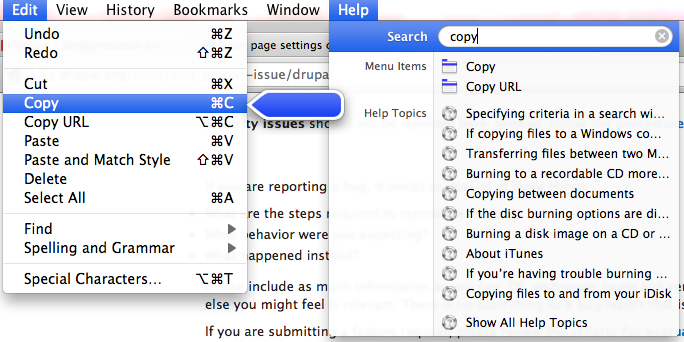
That was an option i used to love when i was an OS X user, that i could avoid drilling into infinite menus by simply hitting some combination (it escapes me now) to get the little search box in the Help menu to pop up. It would automatically do a search among all the menu entries of the application. It's a blessing that i don't use much GUI-heavy stuff any more these days, but that certainly felt like a life-saver at the time.
The Ribbon backfire is pretty well known, but fuzzy search is completely orthogonal to "legacy" UX. You don't need to remove or change anything to give access to a real-time filter of all the menu "namespace".
Thanks, didn't know. So unless he has a few sock accounts, is HUD common knowledge among Unity users and that's why I'm being downvoted, or is it just downvote frenzy?
Right, it was a big announcement, but I just expected the idea to catch like fire everywhere. It was also part of a trend of fuzzy match now featured in many text editors, hence my little prediction, because personally I find it one of the most ergonomic UX.
What do you mean with "staying up"? It is not like you control what is staying up, nor that this is a site where stuff is deleted according to that criteria. That is why your comment is sounding that strange, which explains the downvotes. Has nothing to do with downvote frenzy.
The "staying up" and "will be removed" were both in reference to paxcoder's own original comment in this thread. It appears that some people read it as referring to the parent; perhaps "this comment" would have been better written as "my comment".
It's awkward, until your comment I sincerely had no other interpretation but the 'aggressive' one. And I reread the whole thing thrice because I was utterly confused why someone would 'appear' so commanding. Now it makes a lot of sense.
Thanks for jumping in, you got me. I reckon the reason for downvotes is that others didn't then. Ambiguity didn't occur to me until I've read your comment.
We need some sort of advanced autocompletion where a dictionary is used when creating variable names, for example. This would be helpful if we ever want to be able to program on tablets. It'll probably never be as fast as with a keyboard but it might be useful when taking a bus or subway.
Tell Me is part of Office 2016 desktop edition [1]
It has been part of Office 365 since 2014 [2]:
Available now, an easier, faster and more convenient way of doing things in Word – Tell Me. Tell Me understands what you’re trying to accomplish and helps you do it faster. So if I’m trying to make my document horizontal, Tell Me knows it’s the orientation feature I’m looking for. It brings everything I need to my fingertips.


Google autocompletes your search queries. Bash and zsh offer tab completion as a feature.
iPython and Sublime have both tab completion and autocomplete, but they are different interactions.